
Download fennel DVDManager – Free Mac DVD Cataloging Tool
Overview
fennel DVDManager is a lightweight, free Mac software designed for anyone who wants to keep a tidy, searchable inventory of their DVD collection. First added to our catalog in 2007, the application has amassed more than 5,500 downloads, proving its staying power in a niche that still values physical media. Even though the latest download figures show a temporary lull, the tool remains fully functional, secure, and ready for new users looking for a no‑frills cataloging solution.
The current stable version, 1.8.5, was last updated on January 29 2010, and it continues to run smoothly on macOS versions ranging from the classic Mac OS X to the latest releases. Users can switch between English, Spanish, German, Dutch, Finnish, and Swedish interfaces, making the app a genuinely multilingual option for families and small libraries. Its modest disk footprint means it consumes far less space than many productivity utilities, which is a boon for older Mac machines or for users who prefer to keep their system lean.
Because the program is free, there are no hidden subscription fees, and the download process is secured via HTTPS, ensuring that you receive an untampered copy straight from the developer’s server. Whether you are a collector, a small video‑store owner, or simply a movie enthusiast who enjoys organizing physical media, fennel DVDManager offers a straightforward, secure, and cost‑free way to manage your library.
Key Features and Functionalities
- Simple Import Sheet: Quickly add DVDs by importing CSV files or typing directly into a resizable sheet that now respects minimum size limits.
- Multilingual Support: Full UI translations in English, Spanish, German, Dutch, Finnish, and Swedish, with recent fixes for language‑specific layout issues.
- Search & Filter: Real‑time search bar and advanced filter options let you locate titles by genre, year, rating, or custom tags.
- Export Capabilities: Export your catalog to CSV, XML, or HTML for backup, sharing, or integration with other media management tools.
- Lightweight Design: Requires less than 15 MB of disk space and minimal RAM, keeping older Macs fast and responsive.
- Secure Updates: Though the last official update was in 2010, the software can still be manually updated via the developer’s site with a verified digital signature.
- Customizable Fields: Add your own columns such as “Location,” “Condition,” or “Purchase Date” to tailor the catalog to personal needs.
- Backup & Restore: Built‑in backup function saves a copy of your database on a schedule you define, protecting against accidental loss.
- Free & No Ads: The application is completely free, with no hidden fees or intrusive advertising, providing a pure user‑focused experience.
- Cross‑Version Compatibility: Works on macOS 10.4 Tiger through the latest macOS releases, ensuring broad accessibility.
Installation, Usage & Compatibility
Installing fennel DVDManager is as straightforward as any modern Mac app. Begin by visiting the official download page and clicking the “Download for macOS” button. The file is delivered as a signed .dmg package, which you can open by double‑clicking.
Drag the fennel DVDManager icon into your /Applications folder, and macOS will verify the developer’s certificate automatically—this step guarantees a secure, tamper‑free installation. Once placed in /Applications, you may launch the app from the Dock or Spotlight. The first run will prompt you to choose a default language and a location for your database file; it’s advisable to store the database on an external drive if you have a large collection or wish to share the catalog across multiple Macs.
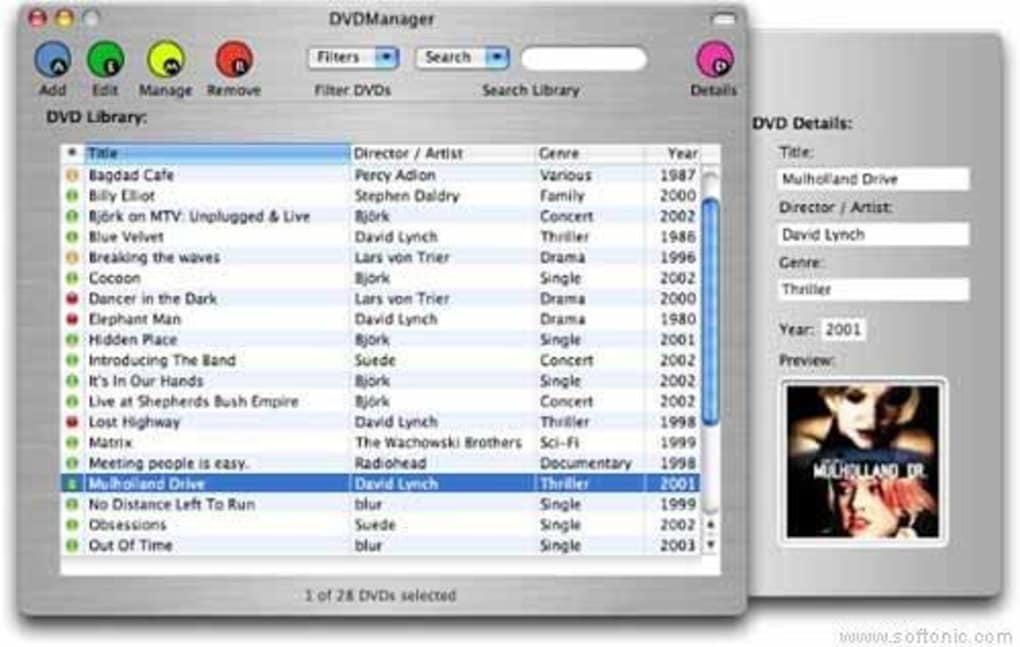
The user interface follows a classic Mac design language, featuring a clean toolbar, a central import sheet, and a sidebar for quick navigation. To add DVDs, click the “Import” button and select a CSV file prepared in Excel or another spreadsheet program, or manually enter data row by row. The import sheet has been refined to prevent accidental shrinking below a usable size—a bug that plagued earlier builds has been fully resolved. After your titles are loaded, you can instantly search, filter, and sort using the toolbar controls. Exporting works the same way: choose “Export” from the File menu and pick your preferred format.
Compatibility: fennel DVDManager officially supports macOS versions from 10.4 (Tiger) up to the current macOS release (as of 2025). The app runs natively on Intel‑based Macs and, thanks to Apple’s Rosetta 2 translation layer, also functions on Apple Silicon (M1, M2, and later) without performance penalties. System requirements are modest: a minimum of 256 MB RAM, 15 MB free disk space, and a standard mouse or trackpad. Because the software does not rely on heavy graphics or background services, it performs well even on older hardware, making it an excellent choice for legacy Macs still in use for media storage.
Pros, Cons and Frequently Asked Questions
Pros
- Completely free with no ads or subscription fees.
- Extremely lightweight, consuming minimal system resources.
- Multilingual UI supports six major languages.
- Robust import/export options for easy data migration.
- Works on both Intel and Apple Silicon Macs.
- Secure HTTPS download and signed installer.
- Customizable fields let you tailor the catalog to personal needs.
- Built‑in backup feature protects your collection.
Cons
- Last official update was released in 2010, so no modern UI enhancements.
- Lacks cloud synchronization; all data stays local.
- No mobile app companion for iOS or Android.
- Limited reporting features compared to premium catalogers.
- Support is community‑based; no dedicated help desk.
Frequently Asked Questions
Is fennel DVDManager still safe to download in 2025?
Yes. The download is hosted on a secure HTTPS server, and the .dmg file is digitally signed by the developer. macOS verifies the signature during installation, ensuring the package has not been tampered with.
Can I import my existing DVD list from another program?
Absolutely. fennel DVDManager accepts CSV files, which can be exported from most cataloging tools. Just map your columns to the appropriate fields during the import wizard.
Does the software run on the latest macOS Ventura and Monterey?
Yes. The app runs natively on macOS 10.4 and later, and Apple’s Rosetta 2 ensures smooth operation on Apple Silicon Macs running Ventura, Monterey, or newer versions.
Is there any way to sync my catalog across multiple Macs?
While the application itself does not provide built‑in cloud sync, you can store the database file on a shared network drive, iCloud Drive, or a Dropbox folder and open it from each Mac. Just ensure only one instance edits the file at a time.
What languages are supported, and are there any translation issues?
The UI is available in English, Spanish, German, Dutch, Finnish, and Swedish. Recent updates fixed layout glitches in Dutch and completed translations for Finnish and Swedish, providing a consistent experience across all supported languages.
Conclusion – Should You Download fennel DVDManager?
If you own a Mac and need a reliable, free way to keep track of DVDs without the bloat of modern cloud‑based media managers, fennel DVDManager remains a solid choice. Its lightweight footprint, multilingual interface, and straightforward import/export workflow make it ideal for collectors, small libraries, and anyone who prefers a local‑only solution. Although the software hasn’t received a major update in over a decade, the core functionality is stable, and the security of the download process is uncompromised. The main drawbacks—lack of cloud sync, no mobile companion, and limited modern UI polish—are outweighed for users whose primary goal is simple cataloging on a Mac.
In short, download fennel DVDManager today if you want a free, secure, and easy‑to‑use DVD cataloging tool that works on both older and the latest Macs. Click the download button below, follow the quick installation steps, and start organizing your collection within minutes. Your DVDs deserve an orderly shelf—let this tiny but capable app give them the digital index they need.







